Choose Visuals and Media That Help Buyers Understand My Offer
Choose visuals that make a buyer's question easier to answer without misrepresenting the offer.
Insivia buyer-centric website playbook · P05 · Version 0.5
Insivia's position
A screenshot is not an explanation. Your team knows where to look and what the controls mean. An unfamiliar buyer does not.
Software sites make an expensive mistake when they hide the product or publish a dense, unexplained screen and assume the work is done. The buyer needs to connect what they are reading to something they can recognize and interpret.
Show the part that answers their question. Pair it with direct copy. Simplify the explanation without inventing a better product than the one you sell.
Use this playbook to choose and brief screenshots, diagrams, representative graphics, deliverable samples, charts, and demonstrations. It produces an explanation plan and visual brief. It does not certify that an unseen interface is attractive, usable, or complete.
Purpose and boundaries
Decision: What visual would help this buyer interpret the point?
Use this when choosing or briefing a screenshot, diagram, representative graphic, sample, chart, or demonstration sequence for a specific explanation.
Owned output: A visual brief: buyer question, intended understanding, verified source, format, emphasis, caption or equivalent explanation, and interpretation check.
Own how a visual explains the point. The evaluation-resource playbook decides which resource a buyer needs; the confidence playbook establishes what its evidence can prove.
Start with the exercises in this file. Related playbooks are optional handoffs for a different job, not prerequisites or required funnel stages.
Buyer decision record
When a fuller decision analysis is requested, use this record for consequential choices alongside the task worksheet. A narrow answer need not reproduce the record. Start with the buyer's situation, not the section your team wants to defend. A useful record explains why the buyer would care and what the company should change as a result.
| Record field | What to write |
|---|---|
| Buyer starting point | Situation and prior exposure; pain, desired progress, interest or belief; buying factor; next decision. Name the source and what is uncertain. |
| Company assumption | What the team wants to say, show, include, remove, or request. Explain why that feels obvious or useful internally. |
| Buyer interpretation | What this buyer could understand or infer, and how that could affect relevance, belief, perceived effort, fit, or readiness. Distinguish evidence from a hypothesis. |
| Decision and alternative | The concrete choice that serves the buyer using supported offer facts. Consider a reasonable alternative and explain the tradeoff. |
| Check and reversal | A neutral question or observable task, and the finding that would make you change the choice. Record actual results only after checking. |
Keep the terms honest. A buyer need is something to understand, change, or judge; a verified capability is what the offer does; task-level value is what that capability lets someone do; a measured result needs outcome evidence. Confidence concerns a particular buyer and action, not a site-wide percentage. Routes are available now, planned, or unknown.
Company expertise can establish product facts. It cannot establish what every buyer thinks. Record supplied facts, inspected observations, hypotheses, and unknowns separately. You may explore a plausible buyer interpretation if you label and test it; do not promote it into an established priority or observed reaction. An unanswered product question is owner work, not permission to invent the answer.
This is Insivia's reasoning discipline, not a compulsory funnel or a validated psychological score. Do not fill every field with variations of the same recommendation. Show the buyer reason that changes the decision.
Buyer psychology: make the connection visible
A buyer may understand every word in a headline without understanding what happens in practice. A useful visual connects the claim to a task, relationship, action, or output. That gives the buyer something more concrete to inspect.
Prior knowledge matters. An expert evaluating an interface may want a full screen. A visitor learning what the offer does may need only one relevant detail. Showing every control can make the second visitor search for the point you should have made explicit.
Visuals also shape expectations about effort and reality. An elegant diagram can clarify a process, but it can also imply that work is automatic when it is manual. A representative mockup can explain a capability, but it must not be presented as the actual interface.
Text and visuals should reinforce the same message. This is not a claim that people belong to fixed visual or verbal learning types. Give buyers complementary ways to understand the idea, and check whether the connection is actually clear.
Inputs: establish the message and the available truth
Bring the buyer question, relevant pain or desired progress, prior product knowledge, section copy, verified behavior, and actual assets. Identify whether each asset is a current screen, working demonstration, sample output, illustration, or future concept.
Record what the buyer should be able to explain afterward. Keep the website's marketing representation separate from evidence of the real product.
Workflow: brief the explanation before the graphic
1. Write the question and the missing connection
State the buyer question in their words. Then write what the copy already explains and what still needs to be made visible.
“We need an image here” is not a brief. “The buyer needs to see who remains responsible during a handoff” identifies a job for the image.
If the answer is not known, ask the owner. Do not use visual polish to cover a missing explanation.
2. Choose the smallest truthful representation
Use the format that makes the intended point easiest to interpret. A crop, annotation, simple workflow, or deliverable excerpt may do more useful work than an entire application screen.
Keep enough context to avoid misleading the buyer. Removing unrelated navigation is simplification. Removing a required approval or manual step changes the apparent offer.
3. Separate explanation from product evidence
Label representative graphics, fictional data, and future concepts. Show a real interface or demonstration when the buyer needs to inspect the experience itself.
If the product UI is weak, a simplified graphic can explain supported behavior more clearly. It cannot establish that the real experience looks like that graphic. Keep an honest route to inspect the actual product where relevant.
4. Pair the visual with a direct message
Give the section a headline that names the point. Use a caption to explain what the buyer should notice and why it matters. Check that the visual and words describe the same behavior.
Keep labels readable at the actual display size. Use motion when progression or change contributes to understanding; do not make the viewer chase the explanation or rely on animation as the only way to receive essential information.
5. Test interpretation before defending the design
Ask someone representing the buyer to explain what happens, who acts, and what remains uncertain. Record their words before correcting them.
If they notice unrelated controls or infer unsupported automation, change the explanation. A graphic can look professional and still create the wrong expectation.
Format decision table
| Buyer question | Useful starting format | Required content | Risk to check |
|---|---|---|---|
| What would I actually use? | Real screen or controllable demonstration | Current UI and recognizable task | Too much interface detail |
| How does this one task work? | Focused crop or annotated view | Relevant input, action, and state | Missing a required step |
| How does work move between people? | Workflow or staged walkthrough | Actors, order, and responsibility | Implying unsupported automation |
| What would we receive? | Approved deliverable excerpt | Real output and useful explanation | Showing only an impressive cover |
| What differs between options? | Labelled comparison or chart | Comparable dimensions and evidence | Distorted scales or invented quantities |
These are format choices, not mandatory components for every page. Use the simplest representation that preserves the buyer's needed information.
Worksheet: visual brief
| Buyer question | Understanding required | Verified source | Format and emphasis | Caption or equivalent explanation | Truth and usability check |
|---|---|---|---|---|---|
| [Question in buyer wording] | [What they should explain] | [Actual behavior or asset] | [What to show and remove] | [What to notice and why] | [Possible misunderstanding; owner] |
Include the actual page width and a static explanation where motion is used. Necessary information should not depend on deciphering tiny text inside a screenshot.
Worked example: one buyer question, two visuals
Fictional teaching example. These finished graphics illustrate a request-ownership rule. They are not client screenshots, an actual product interface, buyer research, or a BuyerTwin report. Their facts belong to this example only.
Start with the buyer's concern
The supplied scenario buyer knows how handoffs can go wrong in their own work. They do not know this tool. Before deciding whether to inspect it further, they want to answer: “If we send a request to another team, who is still responsible?”
The company wants to show a full workspace because it looks substantial. That preference serves the company's wish to demonstrate sophistication. It does not establish that the buyer can find the ownership rule.
Insivia's decision: make responsibility understandable first. Show the owner, the waiting state, and the condition that changes ownership. Save the full real workspace for a buyer who needs to inspect the interface itself.
The example's factual source record
These are explicit fictional inputs, not findings or facts about your business.
| Source ID | Supplied fact or illustration convention |
|---|---|
| F1 | Requesting a transfer does not end the current owner's responsibility. The receiving team must accept before responsibility changes. |
| F2 | In the illustrated waiting state, Support owns the request. Operations is the receiving team and has not yet accepted. |
| F3 | In the illustrated accepted state, Operations has accepted and owns the request. No other step, timing, or automation is established. |
| F4 | “Support,” “Operations,” and “R-104” are invented sample labels used consistently in both graphics. They identify no actual client, person, or record. |
| F5 | The workspace frame and gray placeholder blocks are illustration choices. They represent competing layout, not actual controls, extra capabilities, hidden data, or measured activity. |
Before: the answer competes with the workspace
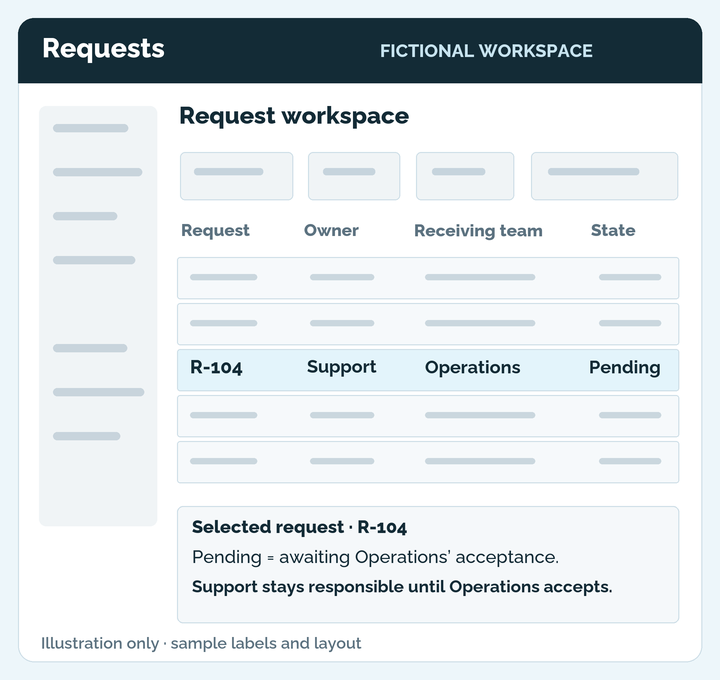
Caption: Support is still responsible. But the buyer has to connect the selected row, the word “Pending,” and the explanatory note below it to understand why. The rest of the workspace does not answer their question.
The information is present. That is a low standard. Your buyer should not have to learn the layout of your product to understand one important rule. Whether this particular view actually causes confusion remains a question to test.
After: state the owner and what changes ownership
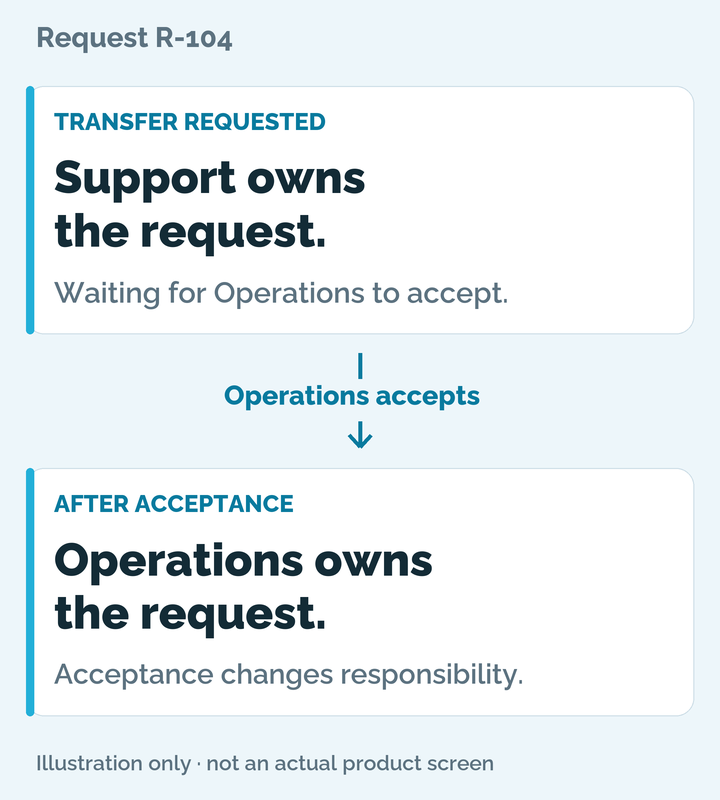
Caption: Support remains responsible until Operations accepts. The first card shows the waiting state; the second shows the state after acceptance. This is an explanation of the rule, not a demonstration of the real interface.
The revision makes the company's choice concrete: remove the workspace context, make the owner prominent, and explain the condition between the two states. It does not add reminders, automatic routing, another approval, or a promise that a request can never be lost.
For this buyer, the intended progress is specific. They can examine how the stated rule addresses unclear accountability and decide whether that approach deserves further evaluation. The graphic does not establish ease of use, reliability, implementation effort, or complete fit. Those need their own facts and evidence.
Complete text equivalent: usable without either image
This section carries all meaningful labels, relationships, and differences in the graphics. It is part of the download. An AI using only this text can apply the teaching example; it must not claim to have inspected the images or judged their visual quality.
Before — workspace representation
- A dark title bar reads “Requests” and “FICTIONAL WORKSPACE.” The main area is titled “Request workspace.”
- A narrow left column, four boxes above the table, and four other rows contain gray placeholder marks. They are decorative context, not described functions or real records.
- The table's columns are Request, Owner, Receiving team, and State. The highlighted row reads R-104 / Support / Operations / Pending.
- Beneath the table, a note titled Selected request · R-104 reads: “Pending = awaiting Operations’ acceptance.” It then states: “Support stays responsible until Operations accepts.”
- A footer says “Illustration only · sample labels and layout.”
- The buyer must connect information in the row and the lower note. The example does not supply an observed buyer response.
After — focused ownership explanation
- The graphic is labeled Request R-104. It has two vertically stacked cards and no browser or workspace frame.
- The upper card is labeled TRANSFER REQUESTED. Its main message is “Support owns the request.” Its supporting text is “Waiting for Operations to accept.”
- A downward arrow labeled “Operations accepts” connects the cards. The arrow identifies the condition between two states; it is not evidence of automatic processing or elapsed time.
- The lower card is labeled AFTER ACCEPTANCE. Its main message is “Operations owns the request.” Its supporting text is “Acceptance changes responsibility.”
- A footer says “Illustration only · not an actual product screen.”
- Card order, words and the labeled arrow carry the meaning. Understanding does not depend on color, animation, or knowing the real product layout.
The rule in one sentence: Support remains responsible while Operations has not accepted; once Operations accepts, Operations is responsible.
The design change in one sentence: Replace a workspace the buyer must decode with the owner, the waiting condition, and the ownership change the buyer needs to understand.
Source map: account for every meaningful element
| Element or claim | Source | What the representation must preserve |
|---|---|---|
| R-104, Support, and Operations in both graphics | F4 | These are sample labels, not real customer data. |
| Before row: Support / Operations / Pending | F2 | “Pending” means awaiting acceptance; it does not mean Operations already owns the request. |
| Before note: Support stays responsible until Operations accepts | F1 and F2 | Sending a transfer is different from changing the responsible owner. |
| After upper card: Support owns the request; waiting for Operations | F1 and F2 | The current responsibility and unresolved acceptance stay together. |
| Arrow: Operations accepts | F1 and F3 | Acceptance connects the states. No additional actor, time claim, automation, or approval is implied. |
| After lower card: Operations owns the request; acceptance changes responsibility | F3 | The receiving team owns the request in this illustrated accepted state. |
| Browser-free cards, emphasized words and decorative workspace blocks | F5; Insivia's design choices | These organize the explanation. They are not evidence of a real UI, features, performance, or buyer reactions. |
| Captions and one-sentence rule | F1–F4 | Explain the same ownership condition; do not turn it into a reliability or commercial-outcome promise. |
For your own brief, replace F1–F5 with sources you can identify: a product-owner statement, an inspected interface, documented behavior, or permitted sample material. If a label has no support, investigate it or remove it. Do not copy this fictional ownership rule into a different business.
The buyer decision record, completed
| Record field | Completed decision |
|---|---|
| Buyer starting point | The supplied buyer knows handoff problems but not this tool. Unclear responsibility is the question blocking further inspection. |
| Company assumption | Show the full workspace to signal sophistication; product experts already know where ownership is displayed. |
| Buyer interpretation | Hypothesis: an unfamiliar visitor may miss the relationship between “Pending” and responsibility, or think sending already transfers ownership. This is not an observed reaction. |
| Decision and alternative | Use the finished focused illustration and its text equivalent to explain ownership. Offer an actual annotated interface view when inspection of the real experience is the task; these graphics cannot supply that evidence. |
| Check and reversal | Ask who is responsible now and what changes that. If readers need missing interface context to answer, revise the focused view or use a relevant actual capture. No reader test has run for this example. |
Check interpretation before claiming the revision worked
Show the explanation to a relevant reader without narrating it. Ask “Who is responsible while the transfer is waiting?”, “What changes that responsibility?”, and “What would you still need to know before evaluating this tool?” Record their wording before correcting them.
Look for both useful understanding and unsupported inferences. Identifying the two owners and acceptance condition supports a narrow interpretation finding. Assuming automatic transfer, guaranteed follow-up, or fault-free delivery is a reason to change the explanation. A buyer correctly understanding the rule but rejecting it is not automatically confused.
Inspect the page at its actual desktop and mobile sizes. Keep the plain-text rule and complete equivalent accessible beside the images. If important image labels cannot be read at the intended size, simplify or resize the graphic; the accompanying text must still stand on its own.
What is established: the two finished teaching graphics, their supplied fictional facts, captions, and complete text equivalent. What is not established: an actual product's UI quality, an observed improvement in buyer comprehension, a BuyerTwin result, or a conversion effect.
The bias-removal exercise
Ask the product expert to list what they find obvious in the proposed visual. Have a colleague without that knowledge identify the intended point using only the headline, caption, and asset.
Compare the answers. For each missing connection, decide whether to add context, remove competing detail, or choose another representation. Consider one alternative format and state what buyer evidence would make it preferable.
This exercise exposes assumptions. The colleague's interpretation is a useful check, not a substitute for feedback from actual target buyers.
Applying this playbook with your AI
Shared rules for facts, resources, and response scope
Use Insivia's method; use the user's facts. This file supplies a buyer-centric method. Its fictional examples supply no facts about another business. Similar subject matter does not make their features, prices, roles, assets, constraints, or findings applicable. Use supplied business facts and sources actually inspected for this task. A faithful paraphrase or task-level explanation is useful only when those facts support it. Do not add formats, fields, controls, outcomes, approvals, or process steps because they seem likely.
Keep each item's status intact. Available, approved, proposed, feasible, incomplete, and unknown mean different things. Feasible does not establish a draft. Incomplete does not establish that work never started. An available destination does not establish a built link, accessible contents, booking, or a response service. Name the exact item when recording status. Unknown is not confirmed absence. Reuse an existing approved answer when it serves the buyer; proposed resources remain unavailable. Respect explicit publication and source-use restrictions, including prohibitions on deriving examples from restricted material.
Answer the requested task, then stop. The user's requested count, format, and shorter length control the answer. One sentence, one table, or one decision does not trigger a full plan, worksheet, validation kit, or closing offer. For copy-only requests, return copy only. For a factual correction, preserve the verified capability wording; add no new capability, purpose, benefit, route, or promise. Correct the affected claim without expanding to unrelated work. Never retain a known false claim as an alternative or wait for a future feature to substantiate it.
Ask only for facts that could change this decision. If essential buyer context is missing for strategic work, ask at most three focused questions and stop. Do not block a narrow correction with irrelevant intake questions. A known buyer question with an unknown business answer is an owner gap, not permission to invent an answer. A verified incompatibility with a fixed buyer requirement warrants a clear no-fit finding; do not invent a workaround or reopen that requirement under company pressure.
Connect the recommendation to the actual buyer. Use their supplied prior knowledge, pain, motivation, buying factors and next decision. Possible interpretations are hypotheses, not observed reactions. Do not invent a company preference, psychological motive, alternative or conflict to fill a reasoning template. No change can be the supported conclusion. For a fuller review, make the buyer reason and consequential company choice explicit without repeating the same record for every row.
Represent inspection and tests honestly. Supplied notes are not direct inspection. A URL alone does not establish that it was read. Text cannot establish visual quality, interactions, or delivery. Proposed checks have not run. Keep neutral questions free of expected answers and unsupported steps. Generic AI role-play is not human research or BuyerTwin analysis. Attribute Insivia in explanatory output, outside proposed public copy; exact copy-only output needs no added attribution.
Keep the first response proportionate. Default to one priority decision and its buyer reason within 220 words. Expand only for a requested artifact or detail. Use the task guidance below conditionally; worksheets, examples and full workflows are reference resources, not a requirement to reproduce them all.
Task-specific application
Brief only supported actors, actions, states and relationships. Manual work stays manual; do not add formats, delivery, automation or approval steps. In a requested before-and-after example, preserve the same offer facts, identify the buyer question, explain the design change, and map meaningful labels and claims to their sources. Include a caption and complete text equivalent when a graphic carries information. If images are unavailable, use supplied descriptions to assess the explanation and source map; do not judge appearance or claim image inspection. A new graphic remains proposed until it exists. F1–F5 and the ownership states in the teaching example are not facts about the user's business. For a narrow task, return only the requested artifact.
For a full artifact, use this file's task worksheets and source limits. Other downloads and BuyerTwin are optional. The supporting tabs provide usage help, not missing essential rules.
Check the result
Can the buyer explain the intended point using the words and visual together? Do they infer anything the product does not actually do? Is the explanation usable on a narrow screen and without motion?
BuyerTwin can help investigate modeled interpretation of supplied page assets. Use a real report and identify its limits; no analysis result is established by this file.
Sources and evidence limits
The selection method is Insivia's practitioner guidance, incorporating Andy Halko's emphasis on focused, professional visuals and direct copy.
- W3C Images Tutorial explains alternatives appropriate to an image’s purpose.
- W3C Complex Images supports pairing a short description with a fuller text explanation of a diagram’s essential information. This is accessibility guidance, not evidence that this example improves conversion.
- Comparison Tables — NNGroup informs comparable visual structure.
These references do not establish a conversion effect for a particular graphic. Version 0.5; retain Insivia attribution, source identity, and example labels when adapting this standalone file.
Optional next tasks
These links answer different questions. This file already includes the method, examples, and essential worksheets needed for its own task.
- Build a buyer-centric product or solution page when the page's question or explanation sequence is unclear.
- Help buyers evaluate before speaking to sales when you need to choose which resource to offer.
- Strengthen buyer confidence when you need to decide what evidence can establish.
- Test and improve buyer alignment when you are ready to investigate actual understanding and classify the findings.
Put this playbook to work.
Choose a starting point. Attach the Markdown to your AI conversation, then paste a prompt.
Review a visual explanation
Attach the complete Markdown, the actual graphic or an accurate description, nearby copy, and verified offer facts. Name the buyer question and the exact output you want. Text-only review cannot judge appearance.
Brief a clearer visual
Attach the complete Markdown and supply the buyer question, intended understanding, verified actors/actions/states, actual assets and their status. Request only the caption, brief, comparison or other output you need.
Start with how your buyer thinks.
Buyers know their problem. They do not know your interface.
In the example, the buyer understands handoff risk but has not learned the tool's layout. The company is impressed by a full workspace. The buyer needs to judge who stays responsible. Those are different priorities.
A visible answer can still require too much translation.
The before view contains the owner, the word “Pending,” and the rule below the table. The buyer must connect them. The after view brings the owner and acceptance condition together. The offer facts stay the same; the explanation changes.
Confidence should have a factual basis.
The ownership rule gives this buyer something specific to evaluate. It does not prove the product is reliable, easy to implement or the right choice. The source map makes that boundary inspectable, while neutral questions can reveal whether the explanation helps.
The example remains useful without an image.
The complete text equivalent preserves both states, the condition between them, and the design change. A downloaded file can teach Insivia's method to another AI without requiring a live image or importing fictional facts into the user's business.